

As I began writing this this, I was attempting to use ChatGPT’s new Team Workspace and compare it to typical Plus…and let’s just say Team Workspace is off to a rough start. Let’s talk about Team vs Plus for ChatGPT
While writing this, Team Workspace struggled to load Custom GPTs, struggled to even go to the page for My GPTs AND explore GPTs. Both of which are one of the biggest draws, the ability to share GPTs with an internal group. The other aspects are definitely appealing, default privacy of chats via no training on data, a higher rate limit on ChatGPT web browser, and a cleaner collaborative space for two or more people. Although it’s still the same clunky UX, recently some upgrades are certainly better than others. One feature is that Builder Profiles, that is individuals who make custom GPTs can connect their GIT, website and other socials, instead of just a website and a name no one could change.
Theoretically “Memory” is incoming, but the way improvements roll out on ChatGPT, there’s no way to properly anticipate them in any reasonable professional sense. Who knows maybe someone will make a Chatbot for that, and then OpenAI will respond by creating a countdown to rollout feature. The “Memory” Feature is compelling, the idea that some prompts and Knowledge you provide the chat, actually is retained by that chat to inform it. Yes, that’s right, it wasn’t actually doing that before. Vector storage isn’t really memory like we think of it, the “weight” of elements of an input doesn’t appear to be grounded on what the user cares about, but rather what the model assumes is important.
The new “memory” feature, basically appears to allow the user to establish what the model needs to know. Alongside “Memory” they’re releasing disappearing chats, which is also essentially the default for Plus if you don’t want to allow OpenAI to use your inputs. The way around that? Custom GPTs allow you to turn that feature off.
Also for any Chat History Links we shared, previously you could just continue a chat, now only Team workspaces can do this. So now any shared chat history from a Plus account is just a cool Webpage with an ad for ChatGPT at the bottom instead of something a lot more powerful. That being said this is still useful within teams to collaborate on a prompt-chain, or use a chat history to prompt for specific Copy, content, or analysis or process. Combined with “Memory” this will serve as a kind of no-code fine-tuning through collaborative prompt engineering, which will honestly be very useful for those who understand it.
Thankfully, the Custom GPT feature came back up later that day, the sharing capacity of a Custom GPT has four options in Team, vs three in Plus. Those options are Private, Anyone Via Link, and Public, the fourth option is Anyone at TEAM NAME. If you’ve created GPTs in Plus, porting them over to Team, requires copying and pasting their instructions and uploading the identical documents, so it’s not very complicated.
Here’s a cost/feature breakdown by OpenAI:
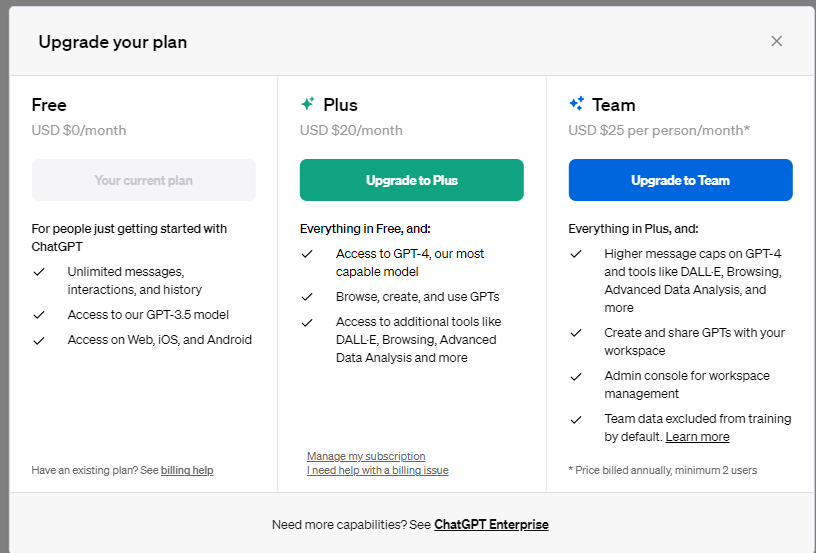
Team costs a minimum of $50, as of this writing, and Plus costs $20. The Team Account does include two individuals, and more individuals can be added for an additional $25 per user.
In our experience ChatGPT Team is absolutely useful for entrepreneurs, small and medium-sized businesses, nonprofit organizations, and professional organizations who want to leverage generative AI collaboratively. It does not by default share training data with OpenAI, so it’s essentially private, which is good for organizations. The collaboration aspects
If you’re interested in learning more about Custom GPTs check out our blog on one we created to follow the Executive Order on AI.
As active members of the local Life Sciences Community in Southern California, We’ll be joining the PDA Annual during PDA Week in Long Beach March 24-28, 2024. If you’re coming as well, make sure to reach out!
 Prompting Integration and Consulting LLC